Loss and Metrics: Ecommerece Text Classification#
Abstract#
In this notebook we will discuss LossMetrics lens and its
applications for text classification.
Imports and Dataset#
import warnings

import numpy as np
import pandas as pd
import matplotlib.pyplot as plt

import torch
import torch.nn as nn
from torch.utils.data import DataLoader, TensorDataset
from torch.nn.utils.rnn import pad_sequence

warnings.simplefilter("ignore")

from torchvision import transforms
from torchtext.datasets import IMDB
from torchtext.data.utils import get_tokenizer
from torchtext.vocab import build_vocab_from_iterator

warnings.simplefilter("default")

from sklearn.model_selection import train_test_split

RND_SEED = 42
device = torch.device('cuda' if torch.cuda.is_available() else 'cpu')
device
device(type='cpu')
For this task we will use Ecommerce Text Classification dataset. It contains class of an item (Electronics, Household, Books and Clothing & Accessories) and its description.
df = pd.read_csv("ecommerceDataset.csv", header=None, names=["label", "text"]).fillna("")
Xtrain, Xval, ytrain, yval = train_test_split(
    df.text, df.label, shuffle=True, random_state=RND_SEED, test_size=0.2
)
df.sample(5, random_state=RND_SEED)
| label | text | |
|---|---|---|
| 35848 | Clothing & Accessories | Kandy Men's Regular Fit Blazer Blue This produ... |
| 13005 | Household | HealthSense Chef-Mate KS 50 Digital Kitchen Sc... |
| 22719 | Books | Concept of Physics (2018-2019) Session (Set of... |
| 18453 | Household | Lista Stainless Steel Multi Functional Hammer ... |
| 20867 | Books | Gardening in Urban India update |
We will use torchtext utilities to tokenize dataset and encode each
word as its index in vocabluary with 10K words. Each description then
will be either padded or truncated to be 32 tokens long, it will make
the data to be ready to use.
tokenizer = get_tokenizer("basic_english")

def yield_tokens(text_iter):
    for text in text_iter:
        yield tokenizer(text)

MAX_TOKENS = 10000
vocab = build_vocab_from_iterator(
    yield_tokens(Xtrain.values),
    specials=[ "<pad>", "<unk>"],
    max_tokens=MAX_TOKENS
)
vocab.set_default_index(vocab["<unk>"])

MAX_LEN = 32
PAD_IDX = vocab["<pad>"]

def encode(text):
    tokens = tokenizer(text)
    ids = vocab(tokens)
    if len(ids) < MAX_LEN:
        ids += [PAD_IDX] * (MAX_LEN - len(ids))
    else:
        ids = ids[:MAX_LEN]
    return ids

Xtrain_ids = torch.tensor([encode(t) for t in Xtrain], dtype=torch.long)
Xval_ids = torch.tensor([encode(t) for t in Xval], dtype=torch.long)

label_to_idx = {label: i for i, label in enumerate(sorted(df.label.unique()))}
ytrain_ids = torch.tensor([label_to_idx[l] for l in ytrain], dtype=torch.long)
yval_ids = torch.tensor([label_to_idx[l] for l in yval], dtype=torch.long)

BATCH_SIZE = 32
train_ds = TensorDataset(Xtrain_ids, ytrain_ids)
val_ds = TensorDataset(Xval_ids, yval_ids)

train_loader = DataLoader(train_ds, batch_size=BATCH_SIZE, shuffle=True)
val_loader = DataLoader(val_ds, batch_size=BATCH_SIZE)
Neural Network Definition#
For this task we will embded each token into a 32 dimensional space, than take a mean embeding over all tokens in a text and pass it through a two layer neural net with ReLU activations and softmax output.
class TextClassifier(nn.Module):

    def __init__(self, embedding_dim, hidden_dim):
        global MAX_TOKENS, PAD_IDX, label_to_idx
        super().__init__()
        self.embedder = nn.Embedding(
            MAX_TOKENS, embedding_dim, padding_idx=PAD_IDX
        )
        self.lin1 = nn.Linear(embedding_dim, hidden_dim)
        self.lin2 = nn.Linear(hidden_dim, len(label_to_idx))
        self.softmax = nn.Softmax(dim=1)

    def forward(self, X):
        embedding = self.embedder(X).mean(dim=1)
        t = torch.relu(self.lin1(embedding))
        return self.softmax(self.lin2(t))
We will also define an early stopping mechanism for regularization.
class EarlyStopper:
    def __init__(self, patience : int = 5, eps : float = 1e-3):
        self.loss = float('+inf')
        self.timer = 0
        self.eps = eps
        self.patience = patience

    def __call__(self, new_loss : float) -> bool:
        if self.loss - new_loss > self.eps:
            self.loss = new_loss
            self.timer = 0
            return False
        self.timer += 1
        return self.timer >= self.patience
Explicit Loss saving#
LossMetrics from monitorch.lens is designed to be a drop in loss
recording tool. During its initialization user may define what
aggregations will be used by providing loss_line and loss_ranges
parameters. To display custom metrics they must be declared to a lens
during initialization, their aggregations can be tweaked the same way
the loss are done by changing metrics_line and metrics_ranges.
The lens allows two ways to record loss, one through an explicit call on
inspector and another one by providing loss function module to the lens.
The first one feels more natural so, we will start with that. To save
loss one needs to call push_loss on an inspector and provide whether
the loss is training or not. There is a symmetric method for metrics
push_metric that also requries to provide name of the metric pushed.
Both of them can be tweaked by optional flag running to be in-place
(default) or in-memory.
from monitorch.inspector import PyTorchInspector
from monitorch.lens import LossMetrics

inspector = PyTorchInspector(
    lenses = [LossMetrics(
        loss_line='median',
        loss_range=['Q1-Q3'],
        metrics = ['val_accuracy']
    )]
)
Let us train a neural net with 16 hidden neurons using stochastic
gradient descent. To obtain a validation loss from last finished epoch
one could use loss(train=False) on the lens object, that way it can
be provided to our early stopper.
model = TextClassifier(32, 16)
stopper = EarlyStopper()

inspector.attach(model)
loss_fn = nn.CrossEntropyLoss()
optimizer = torch.optim.SGD(
    model.parameters(),
    lr=0.001
)

N_EPOCH = 50
for epoch in range(N_EPOCH):

    # Train
    for data, label in train_loader:
        pred = model(data)
        loss = loss_fn(pred, label)
        optimizer.zero_grad()
        loss.backward()
        optimizer.step()
        inspector.push_loss(loss.item(), train=True, running=False) # pushing training loss

    # Validation
    correctly_classified = 0

    with torch.no_grad():
        for data, label in val_loader:
            pred = model(data)
            loss = loss_fn(pred, label)
            inspector.push_loss(loss.item(), train=False, running=False) # pushing validation loss
            correctly_classified += pred.argmax(dim=1).eq(label).float().sum().item()

    inspector.push_metric('val_accuracy', correctly_classified / Xval.shape[0]) # pushing validation accuracy

    inspector.tick_epoch()
    if stopper(inspector.lenses[0].loss(train=False)): # extracting validation loss from lens
        break

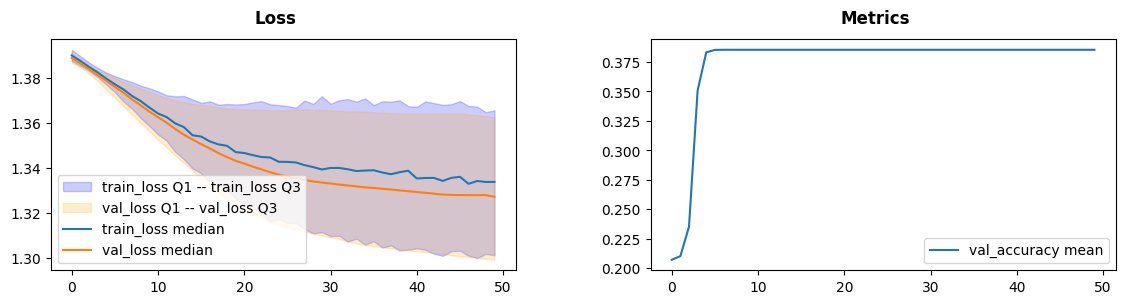
fig = inspector.visualizer.show_fig()
Automatic Loss Saving#
Another option is to provide a loss function to the lens during
initialization, this way no explicit calls must be made. Nevertheless,
for the loss to be recorded it must be firstly computed. Training
requires a loss to backpropagate through, so training pass is not
changed, but we need to compute loss in a validation pass, inspite that
it is not used anywhere explicitly. Loss function module cannot be
disconnected from lens withour direct interegation, so detach and
attach calls can be done without reattaching loss function.
With those thoughts in mind we can define simple functions for training and leave all of the tracing for the inspector and lenses, making our code more expressive.
def train_one_epoch(model, loss_fn, optimizer, dataloader=train_loader):
    for data, label in dataloader:
        pred = model(data)
        loss = loss_fn(pred, label)
        optimizer.zero_grad()
        loss.backward()
        optimizer.step()

@torch.no_grad
def validate_one_epoch(model, loss_fn, dataloader=val_loader, n_val=Xval.shape[0]):
    correctly_classified = 0
    for data, label in dataloader:
        pred = model(data)
        loss = loss_fn(pred, label)
        correctly_classified += pred.argmax(dim=1).eq(label).float().sum().item()
    return correctly_classified / n_val
Below we redefine inspector to record loss from loss function.
loss_fn = nn.CrossEntropyLoss()

inspector = PyTorchInspector(
    lenses = [LossMetrics(
        loss_fn=loss_fn,
        loss_fn_inplace=False,
        loss_line='median',
        loss_range=['Q1-Q3'],
        metrics = ['val_accuracy']
    )]
)
We will now train the very same network to be sure about equivalence of both tracking methods.
model = TextClassifier(32, 16)
stopper = EarlyStopper()

inspector.attach(model)
optimizer = torch.optim.SGD(
    model.parameters(),
    lr=0.001
)

N_EPOCH = 50
for epoch in range(N_EPOCH):
    train_one_epoch(model, loss_fn, optimizer)
    val_acc = validate_one_epoch(model, loss_fn)

    inspector.push_metric('val_accuracy', val_acc)
    inspector.tick_epoch()

    if stopper(inspector.lenses[0].loss(train=False)):
        break
fig = inspector.visualizer.show_fig()

Training slows after 30 epochs, that can be either a problem of a net being too shallow or a problem of our training procedure.
Lastly we will train our model with RMSprop optimizer to get better results.
model = TextClassifier(32, 16)
stopper = EarlyStopper()

inspector.attach(model)
optimizer = torch.optim.RMSprop(
    model.parameters()
)

N_EPOCH = 50
for epoch in range(N_EPOCH):
    train_one_epoch(model, loss_fn, optimizer)
    val_acc = validate_one_epoch(model, loss_fn)

    inspector.push_metric('val_accuracy', val_acc)
    inspector.tick_epoch()

    if stopper(inspector.lenses[0].loss(train=False)):
        break
fig = inspector.visualizer.show_fig()
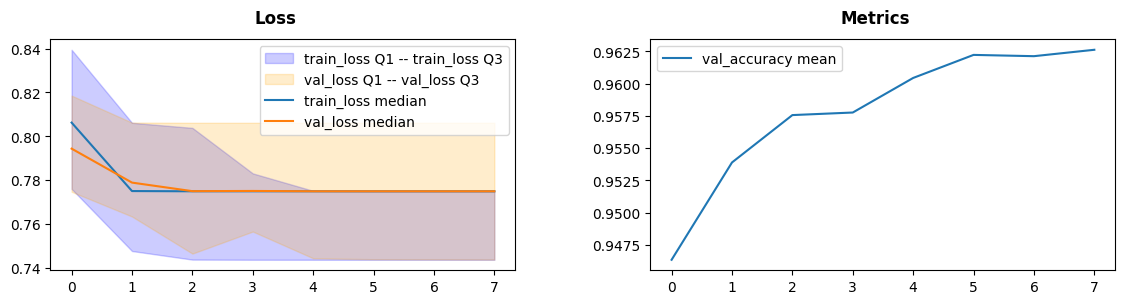
RMSprop was able to learn the data quick (7 epochs) with 96% accuracy we call it a success.
What to Look for#
Loss plateaus are generally a sign of a problem with one of the parts of the procedure
Too much variance in training loss could signal gradient issues (see
GradientGeometryfor that)
Next steps#
Try
LossMetricsfor training your neural networks on other datasets.Take a look at other demonstration notebooks and documentation.
Find how complex losses behave, such as bounding box loss or a CTC loss.